oriole
Browse torrents, stream it, watch it on the TV.
Get Started For Free
-
Get it on Google Play
Step 1: Download free Oriole from Google Play
Free, with no ads and no account to make.
-
Step 2: Add public torrent search to Oriole App
Getting your server ready…One tap opens Oriole, saves the server and tests it. You land on Search, ready to type.
Oriole is an Android app. Scan this with your phone, or open tspsearch.dev on it, and tap Add to Oriole there.
Advanced: copy and paste it yourself
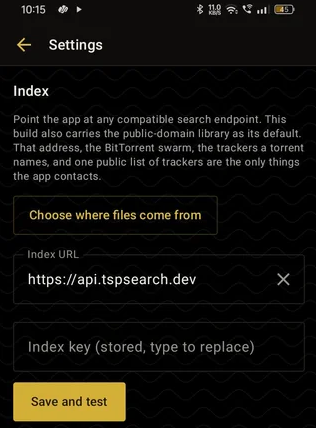
https://api.tspsearch.devmaking you a key…Paste both into Oriole's Settings, under Index URL and Index key, then tap Save and test.
Features
- Browse the entire public torrent index
- Free to use, download and stream torrents
- Cast to TV
- No ads and full privacy
- Download and offline playlist
- Import, export and share lists of bookmarks
- MCP search in natural language
- Schedule topics in natural language
- Open-source integrations via the TSP protocol
Integrations
Oriole's search is TSP, a search API over public torrent indexes: one request, every site asked at once, one merged answer. This is a live instance you can point any client at. Currently searching: loading the list…. It hosts nothing, stores nothing and shows no results of its own. What you search for and what you download are yours to answer for, so check the law where you live before you use it.
qBittorrent plugin
Download the qBittorrent search pluginThe plugin comes with this page's URL and your key inside. In qBittorrent: View, Search engine, Search plugins, Install a new one, Local file.
From a terminal
$ curl -s "https://api.tspsearch.dev/api/v1/search?q=ubuntu&limit=3" \
    -H "X-Api-Key: YOUR-KEY"
# {"query":"ubuntu","count":265,"took_ms":790,"torrents":[{"name":…,"magnet":…,"seeders":…}],"engines":[…]}
$ curl -s "https://api.tspsearch.dev/api/v1/indexers?apikey=YOUR-KEY"   # what it searches
The key goes in ?apikey=, X-Api-Key: or Authorization: Bearer. Same JSON shape as TSP everywhere.
Benchmarks
| Query | Results | Indexes answered | Time | Cache |
|---|---|---|---|---|
| Waiting for a key… | ||||
Measured from your browser, against this instance, just now.